Projects
Building with AI
Lately, I've become really interested in AI and how I can use it to build things. I've spent a lot of time experimenting with different tools, learning how they work, and seeing what I can create. Most of these projects started as simple ideas for things I wanted to use myself.
I'm still learning, but I've really enjoyed turning ideas into working applications, troubleshooting problems, and discovering what's possible. I have plenty of other projects and ways I use AI, but here are a few of my favorites.
Workout Tracker
One of the first apps I built! It lets me track my workouts, monitor my progress, and keep everything from machine settings to rest times in one place.
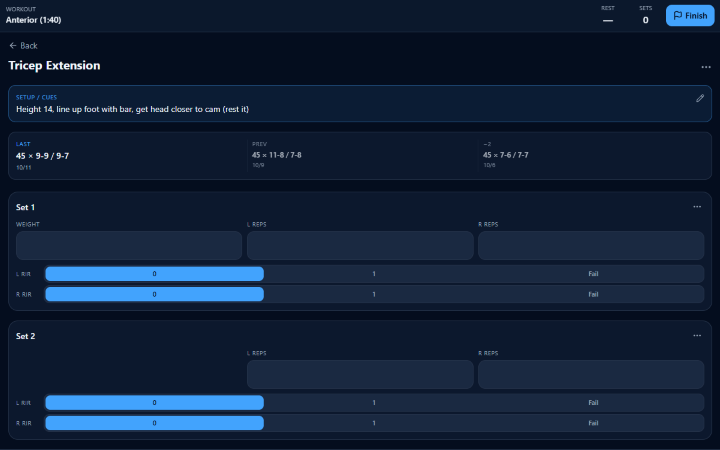
Logging a set 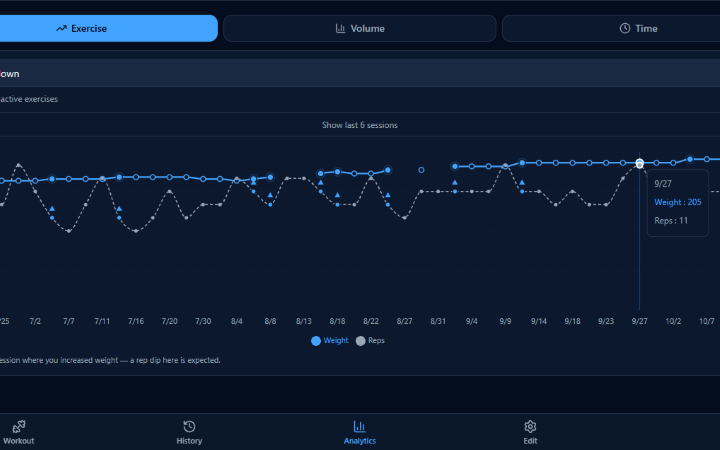
Progress over time See more
This was one of my first apps, and it's become something I use every time I’m at the gym.
On the homepage, I can select which workout split I'm doing that day. From there, I can click on an exercise and see any notes I've saved, like machine settings or cues to remember. I can also see the weight I used and reps I completed over my last three sessions, making it easy to see my progress and decide what to shoot for next.
After each set, I enter my reps and RIR (reps in reserve), and a timer automatically starts to help me keep my rest times consistent. All the data gets saved, so I can easily look back at previous workouts.
I also have an analytics tab where I can see how my performance has changed over time. One of my favorite features is that the app will flag exercises where I've stalled or haven't made progress in a few sessions.
Everything is customizable directly from the website, so I can add, remove, or edit exercises whenever I want. I even have a separate section for tracking cardio.
Logging a set Progress over time Macro Tracker
Tracking calories and macros is important to me, but I wanted to make it as quick and easy as possible. So, I built an app that uses AI to find nutrition information, estimate meals, and remember foods I eat regularly.
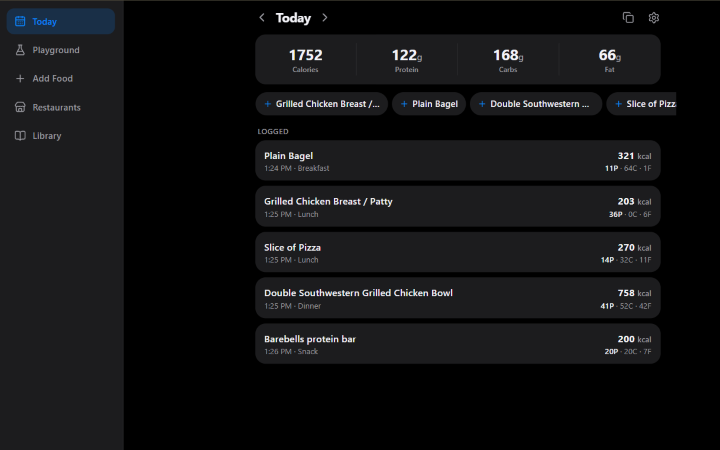
A day of meals 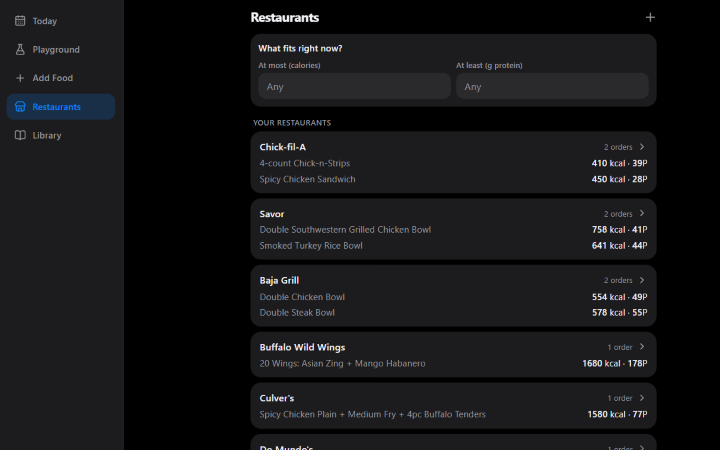
Restaurants and usual orders See more
Keeping track of calories, protein, carbs, and fats is something I do pretty regularly, and this app makes that process so much easier.
The magic behind it is an Anthropic API integration. Instead of manually searching for nutrition information and entering everything myself, I can simply type something like "Chick-fil-A Spicy Chicken Sandwich," and the AI will find the nutrition information and add it to my daily totals.
The app first checks foods I've already saved, which makes logging meals from restaurants I regularly visit even faster. If it doesn't find a match, it searches online for nutrition information.
Of course, not everything I eat has nutrition information readily available. In those cases, the AI does its best to estimate the macros. I also added a photo upload feature, so I can take a picture of my plate to help it understand portion sizes and make a better estimate. This also works for packaged foods, since I can just take a picture of the nutrition label instead of entering everything manually.
I even uploaded nutrition information from Mizzou's dining halls, so I can type in whatever I ate on campus and get a pretty accurate result without having to look anything up.
Another feature I really like is the restaurant tab. When I can't decide what to eat, I can browse restaurants and meals or filter by things like high protein, low calories, and whether a place is open. I also have my usual orders saved, like my typical Chipotle bowl, so I can quickly see their macros or add them to my day.
A day of meals Restaurants and usual orders Notes App
My notes app was becoming a complete mess, so I built my own. It uses AI to automatically organize my random thoughts, lists, and reminders, and even helps me save useful information I come across on social media.
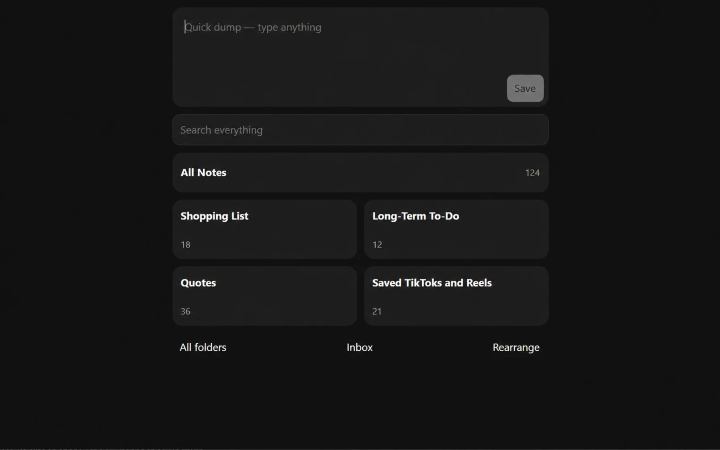
Home screen with the quick dump box See more
I've always used my notes app for just about everything, but eventually it became a massive collection of random thoughts, lists, reminders, and ideas that was nearly impossible to organize.
So, I decided to build my own, with the goal of making it as simple as possible.
My favorite feature is a big box on the homepage that basically serves as a dumping ground for anything I want to remember. I can quickly type something in, and AI automatically sorts it into one of my preset folders.
For example, if I remember that I need to buy water bottles, I can just type "Buy water bottles," and the app will automatically add that to my shopping list. No need to find the right folder or organize anything myself.
Another pretty unique feature is its connection to Instagram and TikTok.
Although I do my best not to scroll too much, when I do, I often come across informational content that I find interesting and want to remember. The problem is that I usually save those videos, and then they end up in a massive collection that I never actually look through again.
My goal was to change that. I connected these platforms to my app so AI could pull useful information out of the videos and save it where it actually belongs.
For example, if I save a video about the best hikes near Portland, Oregon, the AI can review the video, identify the hikes mentioned, and add them to my saved hikes folder.
Instead of having hundreds of saved videos I'll probably never watch again, I can actually make use of the information.
Home screen with the quick dump box Study App
I got tired of Quizlet's ads and distractions, so I decided to build my own version. It has flashcards, voice recordings, and AI-powered feedback to help me study for exams and prepare for interviews.
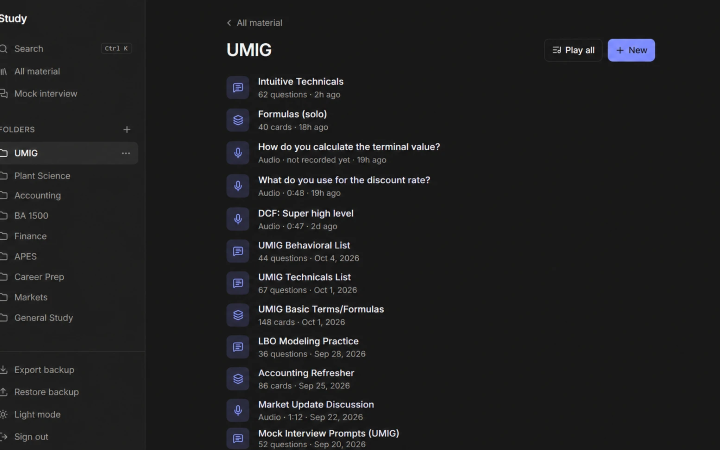
Study material by folder 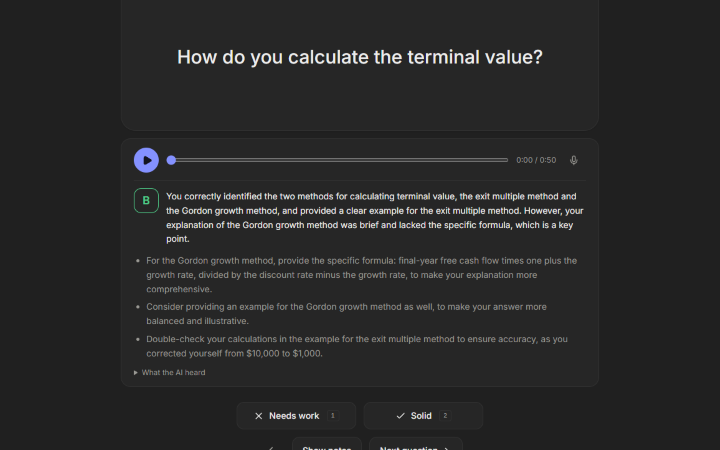
AI feedback on a recorded answer See more
I hate Quizlet.
If you don't know what that is, it's an app where you can create online flashcards and quiz yourself. It's great in theory, but unless you're willing to pay for a subscription, you're dealing with ads, videos, and distractions all over your screen.
Not exactly ideal when you're trying to study.
So, I rebuilt it... but better.
My version has all the basic flashcard features, plus a few things I really wanted.
One of the biggest reasons I built this was interview prep. I've been spending a lot of time studying technical questions and practicing behavioral answers for job interviews and the University of Missouri Investment Group (UMIG).
With my app, I can go through interview questions just like regular flashcards, but I also have the option to record myself answering them out loud.
This has been really helpful because forcing myself to actually say an answer, rather than just thinking about it, makes it much easier to remember. I can also listen back and catch any stutters, "ums," or awkward parts of my answer that I might not have noticed otherwise.
Even better, I can have AI grade my response and give me feedback on what I should improve. I personally like to keep trying until the AI finally gives me an "A" (it's a pretty harsh grader).
I also added a feature for saving audio recordings of things I need to memorize. I like to read formulas, definitions, or explanations out loud and then listen to them while I'm walking to class. I can replay them and try to say everything along with the recording, which has been a really easy way to memorize things without sitting down to study.
Oh, and it doesn't have ads playing ;)
Study material by folder AI feedback on a recorded answer Personal Website
You're looking at one of my projects right now! I originally bought this domain to organize all my apps, but figured I might as well build a personal website while I was at it.
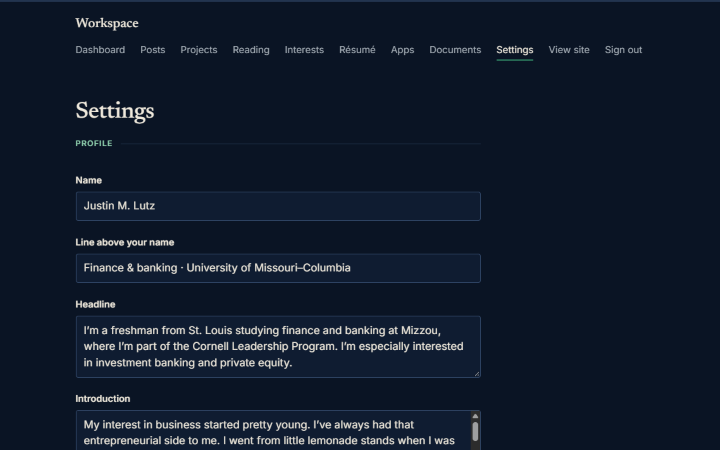
The workspace behind the site: settings 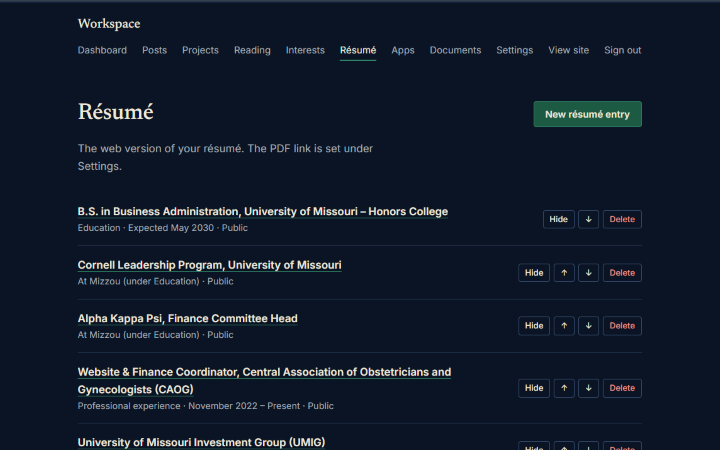
Editing the résumé entries See more
One of the biggest parts of this website is actually something you can't see.
I originally bought my domain name because I wanted a better way to organize and connect all the different apps I was building. But then I figured, if I already own a domain with my name on it, I might as well make a personal website too.
It's been a fun project because it gives me a place to share more about myself beyond what someone would find on my resume or LinkedIn.
I can talk about what I'm working on, things I'm interested in, and experiences I've had that might not necessarily make the cut for a resume. I also like the idea of having a running history of the things I've done and built over time.
Behind the scenes, the website also serves as a central place for connecting and organizing my different applications.
The workspace behind the site: settings Editing the résumé entries Personal Finance Newsletters
I wanted to stay on top of the markets and financial news without spending hours searching through different sources. So, I built a system that emails me a personalized market and finance newsletter twice a day.
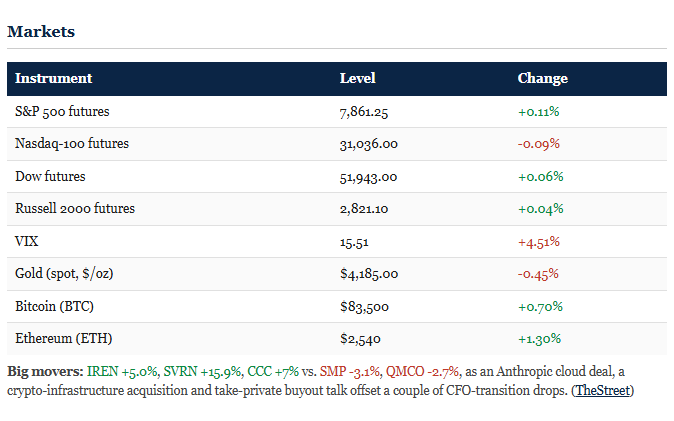
The markets table at the top 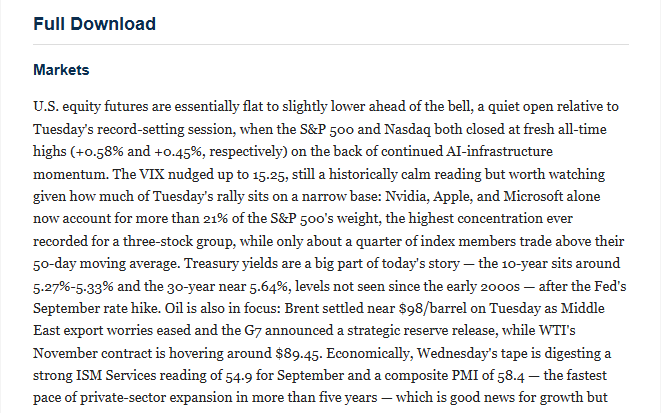
The full download See more
Anyone working in finance will tell you that staying up to date with the news and markets is incredibly important.
This was something I really wanted to get better at, but with so many different news sources, markets, and topics to follow, it seemed like it would take forever to stay on top of everything.
So, I built my own newsletters.
Twice a day, at 7 a.m. and around 4 p.m., I get an email from myself with updates on a bunch of topics I'm interested in.
It starts with an overview of the markets, including major indexes, commodities, and important stocks, along with explanations of what moved and why. From there, it goes into more detail about what's happening across global markets.
I also have sections covering the Fed and the broader economy, geopolitics and global risks, mergers and acquisitions, investment banking, crypto, commodities, and major stock movers. At the end, there's even a section highlighting articles worth taking a closer look at.
What makes this really useful is that it pulls information from so many different sources that would be incredibly time-consuming to check individually.
For example, I can see what prediction markets like Kalshi are saying about the odds of future Fed interest rate decisions. I can get an overview of major geopolitical stories using reporting from several different news outlets. I can even get updates on what's happening in investment banking by pulling from places like Reddit and Wall Street Oasis, where people in the industry discuss everything from recruiting to what's happening at their firms.
I also have links to the original sources throughout the newsletter, so if something catches my attention, I can easily dig deeper.
One of my favorite features is the 60-second skim at the very top. If I don't have time to read the whole thing, I can still get a quick rundown of what's going on.
It's been a great way to keep learning about the markets without having to spend hours every day searching for information.
The markets table at the top The full download
How I built these
Most of these projects were built using Claude Code, with my workout tracker originally built in Lovable. I also use Cloudflare across all of them.
I don't have a traditional software development background, so a lot of the process has involved experimenting, figuring out what works, troubleshooting what doesn't, and learning as I go.
That's honestly been one of my favorite parts. I can start with a random idea for something that would make my life easier and actually turn it into something I use.
I'm excited to keep improving these projects, learning more about how everything works behind the scenes, and seeing what else I can build.